Agent View
The site as an AI agent gets it, beside the site as a person sees it. What it can read, what it has to cut away, and what it never sees.
Knowledge baseBlogAbout usContact🇬🇧 EN🇳🇱 NL🇩🇪 DE🇫🇷 FR
HomeToolKnowledge baseBlogAbout usAdvertiseContact
HomeBlog
Embedding Guides
25 juli 2026
5 min read
by Editorial Team
The Complete YouTube Embed Guide
Everything you need to embed YouTube videos correctly: responsive sizing, privacy-enhanced domains, playback parameters, performance and platform-specific steps.
Reading aid:
Embedding a YouTube video sounds simple: copy a link, paste some code, done. But there is a real difference between an embed that just works and one that is fast, responsive, privacy-friendly and correctly sized on every device. This guide covers all of it in one place.
The rest of the page is in full screen.
Embedding Guides 25 juli 2026 5 min read by Editorial Team

# The Complete YouTube Embed Guide

Everything you need to embed YouTube videos correctly: responsive sizing, privacy-enhanced domains, playback parameters, performance and platform-specific steps.

Reading aid:

Embedding a YouTube video sounds simple: copy a link, paste some code, done. But there is a real difference between an embed that just works and one that is fast, responsive, privacy-friendly and correctly sized on every device. This guide covers all of it in one place.

Table of contents

## In this article

1. [What "embedding" actually means](https://youtubeembedcodegenerator.com/complete-youtube-embed-guide/#what-embedding-actually-means)
2. [The anatomy of an embed code](https://youtubeembedcodegenerator.com/complete-youtube-embed-guide/#the-anatomy-of-an-embed-code)
3. [Making it responsive](https://youtubeembedcodegenerator.com/complete-youtube-embed-guide/#making-it-responsive)
4. [Privacy: youtube.com vs. youtube-nocookie.com](https://youtubeembedcodegenerator.com/complete-youtube-embed-guide/#privacy-youtube-com-vs-youtube-nocookie-com)
5. [Controlling playback](https://youtubeembedcodegenerator.com/complete-youtube-embed-guide/#controlling-playback)
6. [Performance: don't let embeds slow down your page](https://youtubeembedcodegenerator.com/complete-youtube-embed-guide/#performance-dont-let-embeds-slow-down-your-page)
7. [Special formats: Shorts and playlists](https://youtubeembedcodegenerator.com/complete-youtube-embed-guide/#special-formats-shorts-and-playlists)
8. [Where to actually put the code](https://youtubeembedcodegenerator.com/complete-youtube-embed-guide/#where-to-actually-put-the-code)
9. [Building it without writing any code](https://youtubeembedcodegenerator.com/complete-youtube-embed-guide/#building-it-without-writing-any-code)
10. [Common mistakes to avoid](https://youtubeembedcodegenerator.com/complete-youtube-embed-guide/#common-mistakes-to-avoid)

## What “embedding” actually means

Embedding a video means displaying it directly on your own web page through an <iframe>, rather than only linking out to YouTube. YouTube generates a special embed URL for every video (of the form youtube.com/embed/VIDEO_ID), and that URL is what goes inside the iframe’s src attribute. The visible YouTube.com page itself, the one with comments and recommendations, cannot be framed this way; only the dedicated embed URL is built for it.

## The anatomy of an embed code

A basic embed looks like this:

```
<iframe width="560" height="315" src="https://www.youtube.com/embed/VIDEO_ID" title="YouTube video player" frameborder="0" allowfullscreen></iframe>
```

Every part matters. The width and height set a fixed pixel size, which works but does not adapt to different screen sizes. The src URL determines which video plays and which domain handles it (a detail that matters for privacy, covered below). The title attribute is not decorative: screen readers announce it, so a generic or missing title is a real accessibility gap. allowfullscreen lets a visitor expand the player, which most visitors expect from any embedded video.

## Making it responsive

Fixed pixel dimensions look fine on the screen you tested on and break on every other screen size. A responsive embed instead wraps the iframe in a container that keeps the correct aspect ratio at any width:

```
<div style="position:relative;width:100%;padding-bottom:56.25%;height:0;overflow:hidden;">
<iframe src="https://www.youtube-nocookie.com/embed/VIDEO_ID" style="position:absolute;top:0;left:0;width:100%;height:100%;border:0;" allowfullscreen></iframe>
</div>
```

The 56.25% figure is simply the height-to-width ratio of 16:9 video expressed as a percentage (9 ÷ 16 = 0.5625). For a vertical Shorts-style video at 9:16, the equivalent figure is 177.78% (16 ÷ 9). This “padding-bottom trick” has worked reliably across browsers for over a decade, which is why it remains the most common approach, though modern CSS’s aspect-ratio property is a valid, simpler alternative on browsers that support it.

## Privacy: youtube.com vs. youtube-nocookie.com

YouTube offers two domains for embedding. The standard youtube.com domain behaves like the rest of YouTube and can set tracking cookies as soon as the page loads. The youtube-nocookie.com domain is functionally identical but avoids setting those cookies until a visitor actually interacts with the player, which is why it is the recommended default for GDPR-conscious sites. Switching between them is as simple as changing the domain in the embed URL; everything else about the embed stays the same.

## Controlling playback

The embed URL accepts a range of query parameters that change how the player behaves:

- **start** and **end** (in seconds) trim playback to a specific range.
- **autoplay=1** starts the video immediately, though browsers generally require **mute=1** alongside it or autoplay will be blocked.
- **loop=1**, combined with a matching playlist parameter set to the same video ID, replays the video continuously.
- **controls=0** hides the player’s control bar, useful for background-style video.
- **rel=0** limits related-video suggestions at the end of playback to videos from the same channel.

For the complete list with examples, see our [iframe parameters reference](https://youtubeembedcodegenerator.com/youtube-iframe-parameters-reference/).

## Performance: don’t let embeds slow down your page

A YouTube iframe is a relatively heavy element to load: it pulls in the player’s own scripts and a preview thumbnail even before anyone presses play. On a page with multiple embeds, loading all of them immediately can visibly slow down the initial page load. Two fixes handle this well. First, add the native `loading="lazy"` attribute to the iframe, so browsers defer loading it until it scrolls near the viewport. Second, for pages with many videos, consider a “click-to-load” pattern: show a lightweight thumbnail image first, and only insert the real iframe once a visitor clicks it.

## Special formats: Shorts and playlists

Shorts embed exactly like normal videos technically, but need a 9:16 responsive wrapper instead of 16:9 to avoid black bars around the vertical frame. Playlists use a different embed path entirely, /embed/videoseries, combined with a list parameter set to the playlist’s ID, and show next/previous controls that move through every video in the playlist.

## Where to actually put the code

Once you have your embed code, it needs to go somewhere your site’s HTML is directly editable: a Custom HTML block in the WordPress block editor, a rich-text or custom liquid section in Shopify, an embed widget in Wix, or straight into the markup of a hand-coded site. We cover the exact steps for the most common platforms in separate guides for [WordPress](https://youtubeembedcodegenerator.com/embedding-youtube-in-wordpress/), [Shopify](https://youtubeembedcodegenerator.com/embedding-youtube-in-shopify/) and [Wix](https://youtubeembedcodegenerator.com/embedding-youtube-in-wix/).

## Building it without writing any code

All of the above (responsive wrapping, the privacy-enhanced domain, start and end times, autoplay, loop, hidden controls, Shorts sizing and playlist mode) is handled automatically by our free [embed code generator](https://youtubeembedcodegenerator.com/embed-code-generator/). Paste a link, toggle the options you need, and copy the finished code. It runs entirely in your browser, so nothing about the video you are embedding is sent to or stored on our servers.

## Common mistakes to avoid

- Pasting the watch URL (youtube.com/watch?v=…) directly into an iframe’s src instead of converting it to the /embed/ format first.
- Setting autoplay=1 without mute=1, which most browsers will simply ignore.
- Forgetting a descriptive title attribute, which hurts accessibility.
- Using fixed width and height on a page that also needs to work well on mobile.
- Loading many embeds at once on a single page without lazy-loading, dragging down page speed.

With those basics covered, you have everything needed to embed YouTube video correctly: fast, responsive, accessible and privacy-aware, whether you build the code by hand or generate it in a few clicks.

[Embed parameters and customisation](https://youtubeembedcodegenerator.com/tag/embed-parameters-and-customization/) [Embedding guides](https://youtubeembedcodegenerator.com/tag/embedding-guides/) [Platform integration](https://youtubeembedcodegenerator.com/tag/platform-integration/)

Share this article

[LinkedIn](https://www.linkedin.com/sharing/share-offsite/?url=https%3A%2F%2Fyoutubeembedcodegenerator.com%2Fcomplete-youtube-embed-guide%2F) [Facebook](https://www.facebook.com/sharer/sharer.php?u=https%3A%2F%2Fyoutubeembedcodegenerator.com%2Fcomplete-youtube-embed-guide%2F) [X / Twitter](https://twitter.com/intent/tweet?text=The%20Complete%20YouTube%20Embed%20Guide&url=https%3A%2F%2Fyoutubeembedcodegenerator.com%2Fcomplete-youtube-embed-guide%2F) [E-mail](mailto:?subject=The%20Complete%20YouTube%20Embed%20Guide&body=https%3A%2F%2Fyoutubeembedcodegenerator.com%2Fcomplete-youtube-embed-guide%2F)

### Ready to try it yourself?

Use our free tool and get your result in seconds.

[Open the tool, free](https://youtubeembedcodegenerator.com/embed-code-generator/)

Written by

[Editorial Team](https://youtubeembedcodegenerator.com/author/redactie/)

Writes about online tools and practical how-to guides, short and clear.

### Categories

- [Embedding Guides](https://youtubeembedcodegenerator.com/category/embedding-guides/)
- [Platforms](https://youtubeembedcodegenerator.com/category/platforms/)
- [YouTube Explained](https://youtubeembedcodegenerator.com/category/youtube-explained/)

### Recent articles

- [GDPR and YouTube Embeds: 7 Things Site Owners Must Know](https://youtubeembedcodegenerator.com/gdpr-youtube-embeds-things-site-owners-must-know/) juli 26, 2026
- [9 Ways to Speed Up Pages With YouTube Embeds](https://youtubeembedcodegenerator.com/9-ways-speed-up-pages-youtube-embeds/) juli 26, 2026
- [12 YouTube Embed Parameters Explained (With Examples)](https://youtubeembedcodegenerator.com/12-youtube-embed-parameters-explained/) juli 26, 2026
- [YouTube Video Not Embedding? 8 Fixes That Actually Work](https://youtubeembedcodegenerator.com/youtube-video-not-embedding-fixes/) juli 26, 2026
- [6 Signs a YouTube Downloader Site Is Unsafe](https://youtubeembedcodegenerator.com/6-signs-youtube-downloader-site-unsafe/) juli 26, 2026
No <main>: Wrap the page’s own content in <main>, so a reader knows where it starts and stops, and Clean can be measured.
The figures
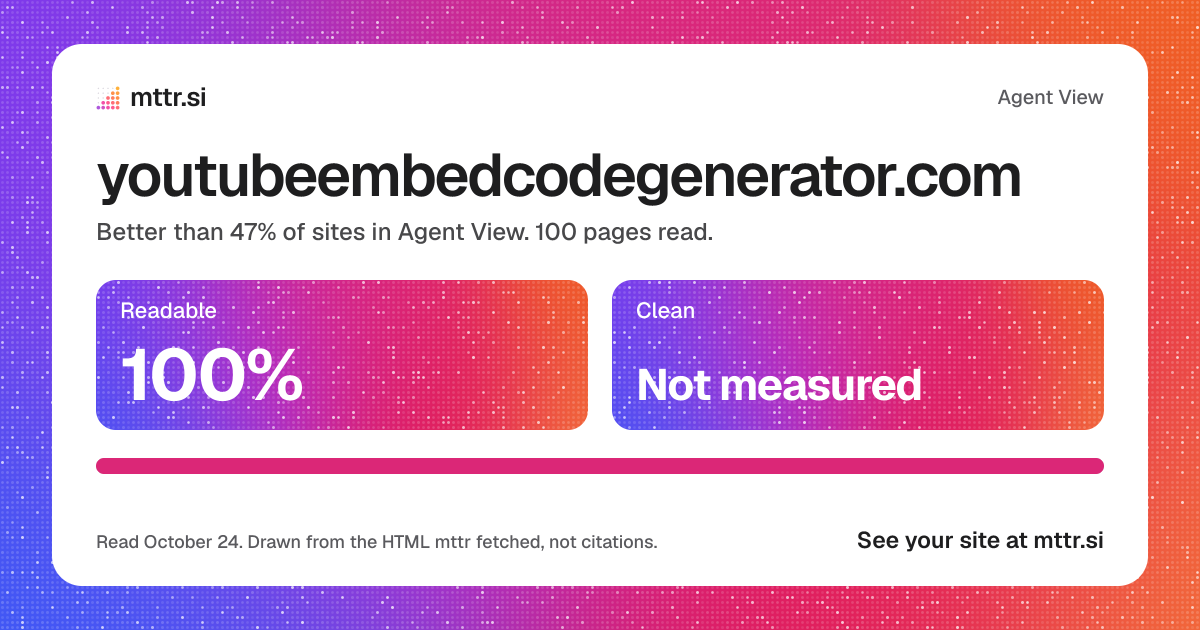
100 pages, set against the 169,995 sites with figures.
- Readablehigher is better
- 100%100 of 100 pages
- All 169,995 sitesBetter than 47%
Pages whose own text is in the HTML the server sends, enough of it for their kind.
- Cleanhigher is better
- Nonemiddle page
- All 169,995 sitesNo place yetWith no figure, it has no place.
Of the words before script, the share that are the page and not menus, footer and forms. 100 pages are not measured, with no <main> or no words.
- Costshown, never scored
- 103,596tokens
- About 1,036 a page
To read every page once. A long page that answers well is not worse for it. Tokens are estimated at about 4 characters each.
How its pages spread on Clean
0 pages measured. Not measured: 100 with no <main> or no words.
Against its rivals
The sites nearest it by what they do, with figures. Close means similar work, not better.
| Readinghigher is better | Costnot scored | ||
|---|---|---|---|
| Site | Readable | Clean | Tokens a page |
| youtubeembedcodegenerator.comThis site, 100 pages | 100% | None | 1,036 |
| youtube.com100 pages | 98% | 42% | 966 |
| copyvideo.ai100 pages | 77% | 91% | 728 |
| youtubetrimmer.com4 pages | 100% | None | 816 |
First of 4 on Readable.
AI crawler access
What robots.txt says to each, as read on October 24, 2026. 8 of 8 may read the site.
| Crawler | robots.txt says | Used for | The line that decides |
|---|---|---|---|
| GPTBotOpenAI | Not named | Training models | No robots.txt |
| OAI-SearchBotOpenAI | Not named | ChatGPT search | No robots.txt |
| ChatGPT-UserOpenAI | Not named | A page a person asks about | No robots.txt |
| ClaudeBotAnthropic | Not named | Training models | No robots.txt |
| Claude-SearchBotAnthropic | Not named | Claude’s search | No robots.txt |
| PerplexityBotPerplexity | Not named | Perplexity search | No robots.txt |
| Google-ExtendedGoogle | Not named | Training Gemini | No robots.txt |
| bingbotMicrosoft | Not named | Bing and Copilot | No robots.txt |
Every AI crawler mttr checks may read it. Not named means the rules for every crawler apply.
Every page
Worst first. Each opens in Agent View at the top.
100 pages of 100 lose something. Pick a loss to see what to do about it.Open the action plan
| What an agent getshigher is better | Signals | Costnot scored | ||||
|---|---|---|---|---|---|---|
| Page | Words | Clean | Readable | Main heading | Tokens | What it loses |
| / | 731 | No <main> | Yes | Yes | 1,392 | No <main> |
| /10-youtube-downloader-myths-fact-checked | 1,893 | No <main> | Yes | Yes | 4,285 | No <main> |
| /12-youtube-embed-parameters-explained | 2,218 | No <main> | Yes | Yes | 5,073 | No <main> |
| /5-legal-ways-to-watch-youtube-offline | 1,830 | No <main> | Yes | Yes | 3,931 | No <main> |
| /6-signs-youtube-downloader-site-unsafe | 1,842 | No <main> | Yes | Yes | 3,989 | No <main> |
| /9-ways-speed-up-pages-youtube-embeds | 2,345 | No <main> | Yes | Yes | 5,050 | No <main> |
| /blog | 112 | No <main> | Yes | Yes | 396 | No <main> |
| /complete-youtube-embed-guide | 1,145 | No <main> | Yes | Yes | 2,633 | No <main> |
| /da/annoncer | 65 | No <main> | Yes | Yes | 125 | No <main> |
| /da/ansvarsfraskrivelse | 177 | No <main> | Yes | Yes | 336 | No <main> |
| /da/blog | 839 | No <main> | Yes | Yes | 2,708 | No <main> |
| /da/cookies | 80 | No <main> | Yes | Yes | 171 | No <main> |
| /da/kontakt | 33 | No <main> | Yes | Yes | 85 | No <main> |
| /da/om-os | 199 | No <main> | Yes | Yes | 377 | No <main> |
| /da/privatlivspolitik | 106 | No <main> | Yes | Yes | 238 | No <main> |
| /da/sitemap | 31 | No <main> | Yes | Yes | 279 | No <main> |
| /de/cookies | 80 | No <main> | Yes | Yes | 188 | No <main> |
| /de/datenschutz | 114 | No <main> | Yes | Yes | 257 | No <main> |
| /de/haftungsausschluss | 185 | No <main> | Yes | Yes | 349 | No <main> |
| /de/kontakt | 34 | No <main> | Yes | Yes | 90 | No <main> |
| /de/sitemap | 32 | No <main> | Yes | Yes | 277 | No <main> |
| /de/ueber-uns | 211 | No <main> | Yes | Yes | 410 | No <main> |
| /de/werben | 69 | No <main> | Yes | Yes | 144 | No <main> |
| /embedding-youtube-in-shopify | 470 | No <main> | Yes | Yes | 1,234 | No <main> |
| /embedding-youtube-in-wix | 455 | No <main> | Yes | Yes | 1,168 | No <main> |
Show where it stands
A card, a badge and a line, each with the figures.
A badge for the site

<a href="https://mttr.si/agent-view/youtubeembedcodegenerator.com"><img src="https://mttr.si/agent-view/youtubeembedcodegenerator.com/badge.svg" alt="Agent View: 100% readable" height="20"></a>
The figures in one line
youtubeembedcodegenerator.com in Agent View: 100% of pages readable, better than 47% of sites; Clean not measured; 103,596 tokens to read all 100 pages. mttr.si/agent-view/youtubeembedcodegenerator.com
What to do next
Fix the pages, let an agent do it, and read the site again to see the figures move.
Fix what agents miss
- Wrap 100 pages in <main>Clean measured
Connect your agent
Claude Code, Codex or Cursor reads the site’s fixes over MCP, fixes a page in your code, has mttr read it again, and checks the fix landed.
https://mttr.si/mcpSet up an agent
Claim the site
Prove it is yours with a DNS record or a file. Your agent can then reach its reads and jobs, and set each change to wait for your approval.
Claim the siteDrawn from the HTML mttr fetched on its read of October 24, 2026, not a screenshot, and only from the 100 pages read, where the read stopped at its page limit. An assistant’s own reader may differ. Tokens are estimated at about 4 characters each. A site an agent reads well is not a site an assistant cites.